TradingView: Track All Markets
- 4.7
- Rating
- 50.00M
- Installs
- Free
- Price

 Analysis by App-foxy
I approached TradingView: Track All Markets as a finance app for people who want more than a quick quote. It brings market charts, technical analysis, trading ideas, and financial news into one mobile workspace, covering areas such as stocks and crypto. After spending time moving between watchlists, charts, and market information, I found it most useful as a decision-support tool rather than a complete replacement for a broker.
The app is free to install, and it is developed by TradingView Inc. Its broad reach is reflected in an average rating of 4.7 from around 870 thousand ratings, with more than 10 million installs. That popularity makes sense: the app can serve a curious beginner checking a company after work, while also giving a more experienced trader enough chart detail to support a regular routine. At the same time, its depth means that the first few sessions can feel busy, especially on a phone screen.
How clearly the app presents information
The strongest part of the experience is the way market information can be organized around symbols and watchlists. Instead of searching for the same company, coin, or other instrument repeatedly, I can use a personal list as a starting point and then open the chart or related information from there. That small change matters when I am checking several markets during a short break. It reduces the need to remember where I last looked and makes the app feel more like a workspace than a collection of isolated pages.
You May Also Like

 Pandora - Music & Podcasts
Pandora’s Music Is Easy to Start, but Harder to Recover
Pandora’s strength is its low-effort path from a seed to a station. Its weak spot is how much confidence it asks you to place in connection, setup, and quiet recovery.

 8 Ball Pool
 Is Built on Rivalries, Rematches, and Routine
A close look at the rivalries, rematches, shared routines, and unanswered safety questions that turn a quick pool match into a persistent mobile community.

 Samsung Music
’s Quiet Strength Is Playing What You Already Own
Its reach comes less from spectacle than from dependable access to a personal library. That simplicity is both the app’s strongest retention engine and its ceiling.

 AccuWeather: Weather Radar
AccuWeather Review: A Quick, Clear Forecast for Everyday Decisions
For everyday plans, the best forecast is the one you can understand quickly. AccuWeather makes rain timing, radar, and local conditions easy to act on, with a few trade-offs.

 Hill Climb Racing
Why Hill Climb Racing Still Turns Crashes Into One More Run
A tiny car, a bumpy hill and one more upgrade: Hill Climb Racing keeps resurfacing because its simple chaos makes every near-miss feel personal.

 AliExpress - Shopping App
AliExpress Makes Global Shopping Feel Personal, but Shoppers Bear the Risk
AliExpress turns a global marketplace into a pocket-sized discovery engine. Its reach is useful, its shopping loop compelling, and its trade-offs easy to miss.
More From Our News Desk
View All News


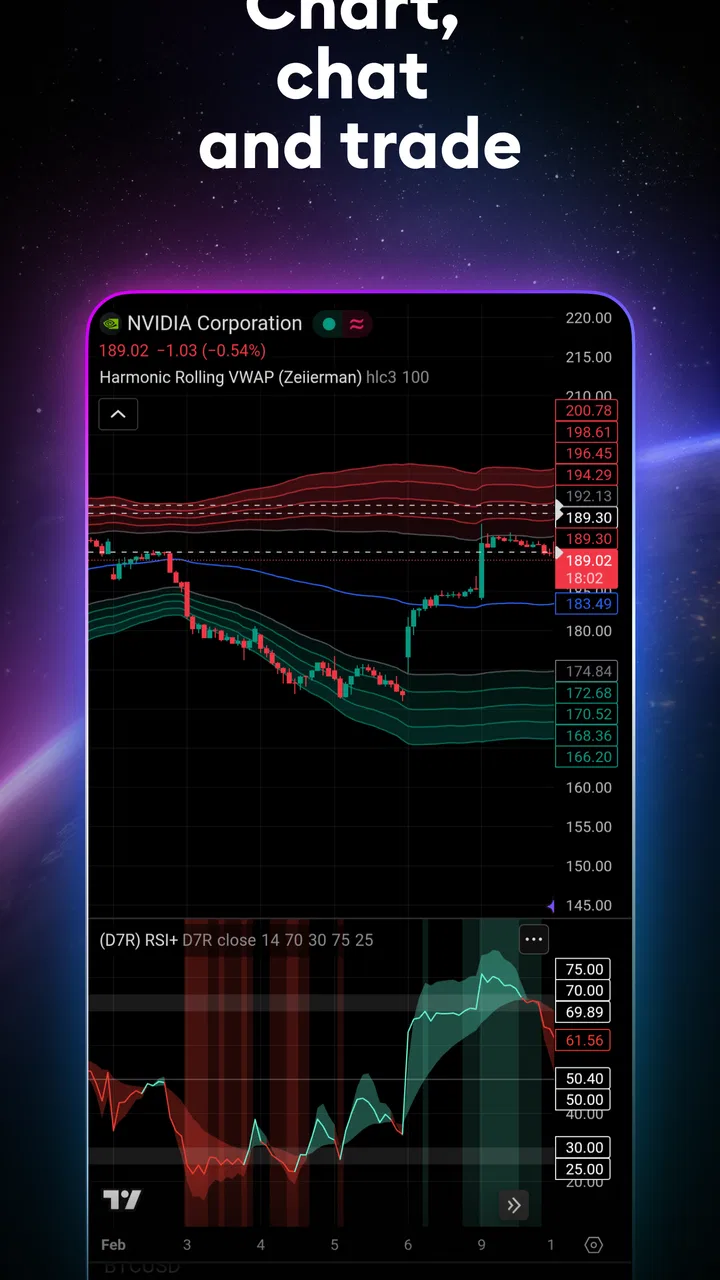
Charts are the center of the experience, and they are also where the interface becomes most demanding. Price movement, time ranges, drawing tools, indicators, and other controls compete for attention. I appreciate that this gives me room to investigate a market rather than relying on a single headline, but I would not call the layout immediately simple. Someone who only wants a clean price alert or a basic company overview may find a dedicated quote app easier to understand.
For readability, I found it helpful to begin with one watchlist and a limited chart setup instead of enabling every available tool. A restrained screen is easier to scan, particularly when I am using the app outdoors, in a moving vehicle, or while switching between it and another task. The practical lesson is to treat customization as part of the setup process: remove distractions first, then add the indicators or chart controls that genuinely support your method.
News and trading ideas add context, but they can also pull attention away from the chart. I prefer to inspect the price structure first and read commentary afterward. That order helps me avoid treating a persuasive idea as a substitute for my own check. The app is at its clearest when I use each area for a defined purpose: watchlists for monitoring, charts for analysis, and news or ideas for additional context.
Learning the navigation without feeling lost
A new user should expect a learning curve. The app is not difficult because the basic actions are hidden; it is difficult because there are many possible actions. I would start by opening a familiar instrument, changing the chart period, and learning how to return to the watchlist. Only after those steps feel natural would I explore technical indicators or drawing tools.
This staged approach is particularly useful for people who process information better when the number of choices is limited. It also helps users who are new to financial charts distinguish between a feature that looks impressive and one that answers a real question. For example, adding several indicators can make a chart appear more sophisticated while making the underlying movement harder to read.
One useful workflow is to create separate watchlists for different purposes rather than placing every interesting symbol in one long stream. I might keep a short list for markets I actively follow and another for research. This separation makes a quick check more manageable and prevents a large collection of possibilities from becoming visual noise. It is a simple organizational habit, but it improves the experience more than constantly changing chart settings.
Using TradingView across different abilities and situations
I’ll focus on how I adapt the app’s chart-heavy workspace to different comfort levels and daily routines, rather than treating one setup as right for everyone. A useful starting point is to decide what I need from a session—quick monitoring, deliberate research, or learning—then limit the screen to the tools that serve that purpose. That makes it easier to judge whether the app fits before its depth becomes distracting.
Motor comfort and touch interaction
On a touchscreen, charts naturally require gestures, taps, and precise selection. That can be comfortable for someone who enjoys exploring price movement with a finger, but less comfortable for a user with tremor, reduced dexterity, or difficulty maintaining a precise touch. Small controls and dense chart areas can turn an easy action into several attempts. I would not recommend judging the app after only one rushed session; the real question is whether the person can establish a reliable, low-effort routine.
To reduce unnecessary movement, I would keep the main watchlist short and avoid repeatedly rebuilding the same chart. Saving a preferred arrangement, where available within the app’s workflow, is more practical than recreating it each time. I also find it better to perform detailed analysis while seated and focused, then use the phone for monitoring rather than trying to complete every complex task during a commute.
People who rely on alternative input methods should test the controls with their own device and setup before making the app central to their routine. I can describe the interface as touch-oriented, but I would not assume that every chart gesture or small control will be equally comfortable for every user. That is an important distinction: an app may contain valuable information while still requiring more physical precision than some people can comfortably provide.
Visual and sensory considerations
Charts depend heavily on visual differences between lines, candles, markers, and other elements. Users with low vision or color-vision differences may need to adjust the surrounding device settings or choose chart presentations that are easier for them to distinguish. I would avoid relying on color alone when interpreting a movement. A direction, label, or numerical value should be checked alongside the visual pattern rather than treated as optional decoration.
For users who are sensitive to visual overload, the app rewards a deliberately quiet setup. A single chart, a small number of indicators, and a focused watchlist can make the screen much easier to understand. I would also avoid making rapid decisions while surrounded by alerts, scrolling information, and multiple open markets. The app can support careful analysis, but it can also encourage constant checking if I allow every signal to compete for attention.
Text-heavy news and ideas may be easier for some people than fast-moving charts, while the reverse may be true for others. That flexibility is a genuine strength: the app offers more than one way to approach a market. Still, the user has to choose the format that works for them. Someone who finds dense financial language tiring may benefit from using the chart and watchlist first, then reading only the articles that answer a specific question.
Quick checks in everyday life
A realistic use case is checking a small group of markets during a lunch break. I can open a watchlist, review the latest movement, look at a longer period for perspective, and read a relevant piece of financial information without opening several unrelated apps. That makes the app convenient when I want context quickly. It is less suitable if I am distracted, have poor connectivity, or am trying to make a complicated decision from a tiny screen.
Another useful situation is preparing for a conversation with a financial adviser or researching a company before making a personal budget decision. I can use the chart to understand how the price has behaved and use news to identify topics worth asking about. I would not treat the app as a personalized recommendation service. Its information can inform a question, but it does not remove the need to consider risk, time horizon, and my own financial circumstances.
The app also works well for people who follow several asset types. Moving between stocks and crypto from one familiar environment is more convenient than learning a separate interface for each category. However, convenience can blur important differences between markets. A consistent layout does not mean that the risks, trading hours, liquidity, or behavior of every instrument are the same. I would use the common interface as an organizational advantage, not as proof that all markets can be approached identically.
Where the experience still creates barriers
The biggest barrier is density. A beginner may open the app expecting a simple market overview and instead encounter a professional-looking chart with unfamiliar terminology. That can make the product feel inaccessible even when the underlying actions are straightforward. I would recommend it to a learner who is willing to explore gradually, but not to someone who wants every screen reduced to a single plain-language answer.
Another limitation is the gap between analysis and execution. TradingView can help me study a market and follow ideas, but a user who expects the app itself to provide a complete, uncomplicated path from research to transaction may prefer a broker’s application. A broker usually centers the account, order process, and portfolio, whereas this app centers market observation and analysis. For some people, keeping those tasks separate is safer and clearer.
The free entry point is welcome, but users should pay attention to the way advanced or optional capabilities are presented. The app includes in-app purchases ranging from $6.69 to $759.00 per item. I would begin with the free experience and identify a specific limitation before considering any purchase. Paying for a feature simply because the interface feels busy is not a good test of value; the upgrade should solve a repeated problem in an established workflow.
The age rating is Everyone, which makes the app broadly approachable from a store perspective. That should not be confused with being financially risk-free or automatically suitable for every young user. Market information can be educational, but decisions involving real money require maturity and supervision appropriate to the person’s circumstances. I would introduce the app as a research and learning tool, not as a shortcut to guaranteed results.
Who will benefit most from it
I think the best match is someone who wants to build a repeatable market-monitoring habit. That could be a long-term investor reviewing a watchlist, a student learning how charts work, or an active market participant who values technical tools on a phone. The app is especially useful when the user enjoys comparing time periods, organizing symbols, and forming questions from several information sources.
It is also a good choice for people who want one familiar place to follow both traditional markets and crypto. The ability to move between those interests without changing apps keeps research convenient. The trade-off is that the user must supply the discipline: the app can show many possibilities, but it cannot decide which ones deserve attention or how much risk is appropriate.
I would suggest a different option for someone who only needs account balances, simple transfers, or a very guided investing experience. A banking or brokerage app may be less intimidating for those goals. I would also hesitate to recommend this as the only tool for someone who has difficulty with small touch targets, visual chart density, or fast-changing information and cannot comfortably adapt the display through their device or personal workflow.
My inclusive verdict
After using it as a mobile research tool, I see TradingView as powerful but not effortless. Its strongest inclusive quality is flexibility: I can narrow the experience to a watchlist, focus on charts, read market context, or combine those areas depending on my needs. That makes it possible for users with different habits and levels of experience to create a workable routine rather than follow one fixed path.
Its weaker side is the amount of visual and conceptual information placed within reach. Users who need large, highly simplified controls or a gentle, step-by-step financial interface may have to work harder than they would with a basic investing app. I would test the app with a small watchlist, one chart style, and a short session before committing to it. If that setup feels comfortable, the deeper tools can be added gradually.
For me, the most sensible way to use it is as a clear window onto markets, not as an authority that makes decisions on my behalf. I would check the app at planned times, verify important details, and keep execution and personal financial planning separate when necessary. Used that way, it offers meaningful depth without requiring me to stare at every signal.
My recommendation: choose it if you want detailed market tracking and are prepared to learn the interface at your own pace. Skip it in favor of a simpler alternative if your priority is effortless portfolio management or a minimal number of choices. For users who value customization and can manage chart density, TradingView: Track All Markets remains one of the more capable free starting points for following stocks, crypto, technical analysis, trading ideas, and financial news on a mobile device.
FAQs for TradingView: Track All Markets
01What features does TradingView: Track All Markets offer?
TradingView provides a comprehensive suite of tools for traders and investors, including real-time charts, customizable indicators, and a social network for sharing ideas and strategies. It supports a wide range of markets, including stocks, forex, and cryptocurrencies, making it versatile for various trading needs.
02Is TradingView suitable for beginners?
Yes, TradingView is designed to cater to both beginners and advanced traders. It offers user-friendly interfaces, extensive tutorials, and a community-driven platform where beginners can learn from experienced traders. The app’s intuitive design helps new users navigate through complex market data with ease.
03What are the subscription options available on TradingView?
TradingView offers a tiered subscription model, including a free version with limited features and several paid tiers that unlock advanced tools and benefits. Premium subscriptions provide access to more indicators, alerts, and additional functionalities crucial for professional and active traders. Users can choose based on their trading needs and budget.
04How reliable is the data provided by TradingView?
TradingView is known for its high reliability and accuracy in providing market data. It aggregates information from multiple sources, ensuring users have access to real-time and comprehensive data. However, users should always verify critical data from multiple sources before making trading decisions.
05Can I use TradingView on multiple devices?
Yes, TradingView is accessible across multiple platforms, including web browsers, iOS, and Android devices. Users can seamlessly switch between devices, ensuring that they stay updated on market trends and their trading activities anytime, anywhere. This cross-platform compatibility is ideal for traders on the go.
Pros
- Comprehensive market analysis tools.
- Customizable charts and alerts.
- Real-time data across platforms.
- Supports multiple asset classes.
- User-friendly interface for beginners.
Cons
- Requires premium for advanced features.
- Occasional lag during market peaks.
- Limited offline functionality.
- Ads in free version can be intrusive.
- Steep learning curve for new users.

TradingView: Track All Markets
Gallery